
1. What Is Google Trends?
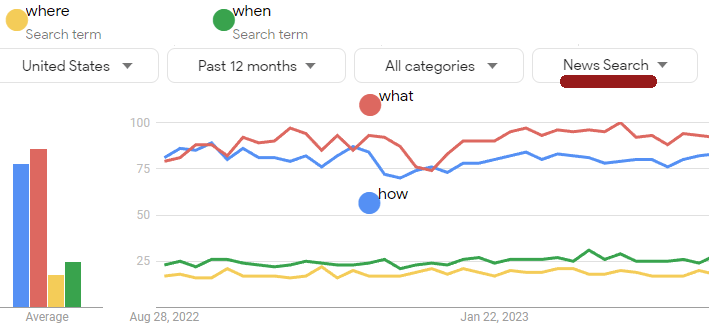
Google Trends tracks search term popularity over time, offering insights into how interest in topics rises or falls. It allows you to:
- Compare search terms
- Identify breakout topics
- Explore trends by region or time period
- Spot seasonal content opportunities
By analyzing search behavior, you can create content that meets real user demand.
2. Find Trending Topics in Real Time
The “Trending Searches” and “Explore” sections help identify what’s popular now. You can:
- Discover daily trending searches
- Find real-time spikes in interest
- Filter by region or category (e.g., health, business, entertainment)
This is perfect for creating timely blog posts or social media content.
3. Compare Keywords to Strengthen SEO
Use Google Trends to compare up to five keywords. You’ll see which has higher interest and where it’s growing. This data helps you:
- Choose the best primary and secondary keywords
- Target terms with rising popularity
- Create content clusters for related topics
4. Identify Seasonal Patterns

Many searches repeat annually—like “tax tips” or “holiday recipes.” Google Trends reveals these seasonal peaks so you can publish content at the right time. Plan your content calendar around these recurring trends to maximize visibility.
5. Discover Regional Insights
Different regions may show varying levels of interest. Use this data to:
- Localize content and keywords
- Run targeted campaigns
- Adapt messaging for specific markets
For example, a topic popular in the U.S. may not trend in Europe at the same time.
6. Use Related Queries for Inspiration
Google Trends displays “related queries” for each topic. These show what users are also searching for, giving you:
- New blog post ideas
- Long-tail keyword opportunities
- Subtopics to expand existing articles
7. Combine Google Trends with Other SEO Tools
For a deeper strategy, pair Google Trends with tools like:
- Google Keyword Planner for volume data
- Ahrefs or Semrush for competition analysis
- AnswerThePublic for question-based keywords
Combining insights from multiple sources ensures a strong, data-backed content strategy.
8. Track Brand and Competitor Interest
You can also track how interest in your brand compares to competitors. Analyze search trends for:
- Brand name mentions
- Product interest over time
- Market awareness shifts
This helps refine marketing decisions and benchmark growth.
Conclusion
Google Trends empowers you to create relevant, timely, and audience-driven content. Whether you’re planning your next blog post, optimizing for SEO, or launching a campaign, it helps you align your content with real-world interest and stay ahead of trends.